
Financial modeling is a basic tool in finance, which has come up because investment banking, corporate finance and decision-making is complex. Excel financial modeling allows one to work with data, forecast outcomes, and calculate the financial wellbeing of an organization in a smooth manner. With the Excel tool still being the universally used tool of the trade in modeling complex financial models. Mastering this competency complements analytic abilities and command of investment banking skills; therefore, it will be relevant to the career advancement in finance.
Understanding the Core Concepts Behind Financial Modeling:
Financial modeling is the process of creating a model which will outline financial information of a firm to facilitate its analysis, planning, and decision making. It helps working individuals to evaluate companies, investments, and projects based on certain assumptions concerning gains.
Key financial model elements are:
- Assumptions: Growth rates, interest rates, and cost estimation of the organisation are some of the variables.
- Inputs: Financial data available publicly and historical financial information.
- Calculations: Future predictive financial ratios, quantitative models.
- Outputs: The final analysis has a valuation, cash flow or any other profitability model.
Financial modeling plays a crucial role in valuation, capital budgeting and analysis of investment. Thus, the individuals working in the financial industry, particularly investment banking should understand how these two concepts complement each other to generate accurate insights.
Learn About: What is Financial Modeling
Types of Financial Modeling in Excel for Analysts & Bankers
Financial modeling is a very important tool in most areas, such as investment banking services, and management throughout the business. Each of the models is different in its application. Therefore, an individual must understand various financial models. The most common ones, both basic and complex, are listed below:
- Discounted Cash Flow (DCF) Model: DCF model is one of the most generally used models to determine the value of a company or an asset based on the future cash flows and present value. It is a requirement tool in valuation appraisal and investment banking.
- Merger and acquisition (M&A) Model: This model comes in handy in establishing the fiscal efficiency of mergers and acquisitions in prospective synergies and cost-efficient lines of a deal. It usually entails combining the financial statements of two companies to examine their outcomes following a merger.
- Leveraged Buyout (LBO) Model: LBO Model is the model of LBOs and private equity firms to estimate the feasibility of consolidation of a firm in terms of debt. This model calculates the returns for equity investors and evaluates the target firm’s ability to maintain its debt.
- Budgeting and Forecasting Models: The models are helpful in making organizations predict their revenues, expenses and cash flows in the next periods. They are usually adopted in corporate finance to align resources with the anticipated goals.
Each of these forms of financial modeling offers alternative views and the ability to use the expertise of several models in stills cross-discipline in investment banking. These models are as straightforward as the DCF model and the complex LBO and, as we have observed, they take centre stage in the decision-making process.
The Reasons Excel Dominates Financial Modeling in Finance
Microsoft Excel still takes the lead in financial modeling because it is flexible, easy to use, and used in a computationally intensive task. Constructing either a simple cash flow model, or a more complex leveraged buyout (LBO) model, Excel can help to index, analyze, and report financial information in a logical and clean platform.
Some of the reasons why financial modelling in excel is so popular are:
- Flexibility: It is flexible because the Excel makes these layouts, entries and formulas which can be replaced/substituted as per the requirements of the financial model in question.
- Functions and Formulas: Special functions like VLOOKUP, SUMIFS FUNCTIONS, and INDEX MATCH FUNCTIONS are used easily to carry out financial analysis.
- Data Visualization: Built-in charting in excel is very powerful, and PivotTables transforms the information received into easy to use charted information.
- Accessibility: Excel is currently standard software in the majority of companies across the world. It possesses numerous features, particularly teamwork and financial analysis features.
Financial officers in investment banking and corporate finance use Excel because it is flexible, easy to use, and versatile, even though specialized software exists.
How to Build a Financial Model in Excel: Step-by-Step Guide
When developing a financial model using Excel, it is important to observe that there are certain rules which need to be accurate, comprehensible and simple to operate. This is a step-by-step process of writing an effective model:
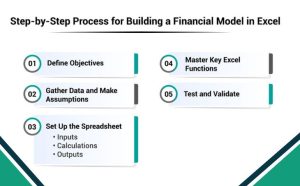
#1 Define Objectives
When creating the model, it is important to mention why it is formed. Do you need your model to provide a cash flow forecast, a valuation, or a budgeting tool? With the purpose in mind, it becomes simple to formulate your assumptions and the structure you are going to apply.
#2 Collect Data and Assumptions
Get the relevant financial data, such as the past financial reports, market dynamics, and economic reports. State what your model is based upon, e.g., what are your growth rates, cost of capital, or margin.
#3 Set Up the Spreadsheet
Divide your model into three major parts:
- Input: To facilitate replacement in case of changes in the model assumptions, all the assumptions and the inputs must be inputted in a single textbox.
- Calculations: Carry out all possible operations in an adjacent section of the layout and tie them in with the inputs.
- Outputs: The most optimal method in incorporating the conclusion section is to design a clean isolated section. Where financial projections or other vital findings like cash flows, profit margins or value ratios will be located.
#4 Master Key Excel Functions
Use Excel functions like:
- Data is looked up using VLOOKUP/INDEX MATCH.
- Vertical lookups (VLOOKUPs).
- IF statements control the scenario analysis process.
- PivotTables in which lots of data is displayed and processed.
#5 Test and Validate
Conducting sensitivity analyses on the model is a method of helping to verify the presence of errors in the model. By comparing the output or the results of the developed model and different base cases. Cross-check by comparing your results with the way you have done it or with the way the others in the same industry are doing it.
In this wide-method, you will be in a position to develop a solid financial model which is quite useful as well.
Get Now: Financial Model for BPO Company
Ready-to-Use Financial Model Templates
Excel is a very effective financial modeling tool, creating a model in a vacuum could be time-consuming, complex and confusing. Especially to those with multiple projects on their hands or new to the higher-order techniques of using excel. Hours of organising assumptions, connecting computations, and presenting results can slow down the decision-making process, even for experienced analysts.
To solve this issue, you can take advantage of investor-accepted financial model templates. The templates are also professionally written and simple to comprehend and can be customised completely. Users can rapidly adapt the templates to the financial data of the company or the project. Not only save time but they minimise the risk of error. Also assure that your model reflects the industry best practices and investor expectations.

How to use them effectively:
- Go to the FundTQ web site – a reliable source of financial model templates.
- Search using financial model templates or industry.
- Choose the most suitable model based on your type of business e.g. startups, SMEs, or corporate finance case.
- Get a template and fill it in with your financial information, assumptions, and forecasts.
- Check and confirm the results to see that it is based on your situation and business goals.
With such templates, you will be able to spend more time on analysis, strategy and decision making than on building a spreadsheet which will take a lot of time. They offer a professional, organised and credible system that saves time in the financial planning and impresses investors or stakeholders.
Top Excel Techniques to Enhance Your Financial Models Effectively
In order to master your financial modeling skills in Excel. Then you should concentrate on the critical methods that make your models more effective. Basic Excel functions are useful in the analysis of data but are simple in nature. Whereas complicated functions are invaluable especially in financial organizations.
The most applicable is a scenario analysis which allows considering various results under some assumptions. Goal Seek and Solver of Excel are also significant as far as financial model generation is concerned. As they offer a way to obtain the level of input that will give specific output.
Also, use of Macros and VBA (Visual Base of Applications) automate the processes. Thereby lowering the time used in repetitive processes and giving uniformity to the models.
These are the three advanced techniques that are critical to apply:
- Scenario Analysis: Compare various financial outcomes based on the variation of some assumptions.
- Goal Seeker and Solver: Optimise performance of the company using math to achieve a specific level of performance based on financial performance.
- Macros and VBA: To become more effective and help avoid mistakes in financial modeling.
The use of these techniques will make your models more accurate and the usability of the results three times better.
Bottom Line
Any hopeful who wants to succeed in the investment banking skills must have knowledge of financial modeling in Excel. Recognize financial modeling and improve your technical ability in excel functions. Which will make you more viable in the business world. Training is also imperative in the development of a particular career. As it fines the skills and informs the concerned person of the market trends. Acquire and practice the skills required to operate under the complex environment in the field of finance and to be a successful person in it.